Interface with gammapy
This notebook demonstrates how you can easily set up a model for gammapy that interfaces with the OptDepth class from ebltable. For this notebook to run, you need to have gammapy installed. I tested the notebook with gammapy version 1.0.
We start with the necessary gammapy imports.
[1]:
from gammapy.modeling.models import TemplateSpectralModel, SpectralModel
from gammapy.modeling import Parameter
And continue with addtional imports.
[2]:
import matplotlib.pyplot as plt
import numpy as np
from astropy import units as u
from ebltable.tau_from_model import OptDepth
Then we pick an EBL model in initialize the OptDepth class. For illustration we also set up a gammapy template spectrum. For this, it’s however not possible to change the EBL normalization parameter.
[3]:
ebl_model = 'finke2022'
[4]:
tau = OptDepth.readmodel(model=ebl_model)
[5]:
z = 0.2
ETeV = np.logspace(-1,1.5,50)
[6]:
atten = np.exp(-1. * tau.opt_depth(z,ETeV))
[7]:
template = TemplateSpectralModel(energy=ETeV * u.TeV, values=atten)
Now we build our own spectral model class. The class has the possibility to be initiated from a built-in model.
[8]:
class OptDepthSpectralModel(SpectralModel):

    r"""Gamma-ray absorption models build from the `~ebltable` package.

    Parameters
    ----------
    optdepth : `~ebltable.tau_from_model.OptDepth`
        optical depth class
    redshift : float
        Redshift of the absorption model
    alpha_norm: float
        Norm of the EBL model
    """

    tag = ["OptDepthSpectralModel", "tau-norm"]
    alpha_norm = Parameter("alpha_norm", 1.0, frozen=True)
    redshift = Parameter("redshift", 0.1, frozen=True)

    def __init__(self, optdepth, redshift, alpha_norm):
        self.optdepth = optdepth
        self._cashed_redshift = None
        self._cashed_tau = None

        super().__init__(redshift=redshift, alpha_norm=alpha_norm)

    @classmethod
    def read_model(cls, model, redshift, alpha_norm=1.):
        """
        Initiate the class from a built-in model

        Parameters
        ----------
        model: str
            model name implemented in `ebltable.tau_from_model.OptDepth`

        redshift: float
            source redshift
        """
        optdepth = OptDepth.readmodel(model=model)

        return cls(
            optdepth=optdepth,
            redshift=redshift,
            alpha_norm=alpha_norm,
        )

    def evaluate(self, energy, redshift, alpha_norm):
        """Evaluate model for energy and parameter value."""
        if self._cashed_redshift is None \
            or not self._cashed_redshift == redshift:

            try:
                self._cashed_tau = self.optdepth.opt_depth(redshift.value, energy.to(u.TeV).value)
            except AttributeError:
                self._cashed_tau = self.optdepth.opt_depth(redshift, energy.to(u.TeV).value)

        absorption = np.exp(-self._cashed_tau * alpha_norm)
        return absorption
Initialize the class from a built-in model is done in the following way:
[9]:
optdepth = OptDepthSpectralModel.read_model(ebl_model, z)
Here are the parameters of the model:
[10]:
optdepth.parameters.to_table()
[10]:
| type | name | value | unit | error | min | max | frozen | is_norm | link |
|---|---|---|---|---|---|---|---|---|---|
| str8 | str10 | float64 | str1 | int64 | float64 | float64 | bool | bool | str1 |
| spectral | alpha_norm | 1.0000e+00 | 0.000e+00 | nan | nan | True | False | ||
| spectral | redshift | 2.0000e-01 | 0.000e+00 | nan | nan | True | False |
Lastly, we plot everything for comparison.
[11]:
plt.loglog(ETeV, atten, label="Input")
plt.loglog(ETeV, template(ETeV * u.TeV), ls='--', label="Template spectral model")
plt.loglog(ETeV, optdepth(ETeV * u.TeV), ls='-.', label="OptDepth spectral model")
plt.loglog(ETeV, optdepth.evaluate(ETeV * u.TeV, z, 2.), ls='-.', label=r"OptDepth spectral model, $\alpha = 2$")
plt.ylim(1e-10, 2.)
plt.legend()
[11]:
<matplotlib.legend.Legend at 0x14b9fd340>
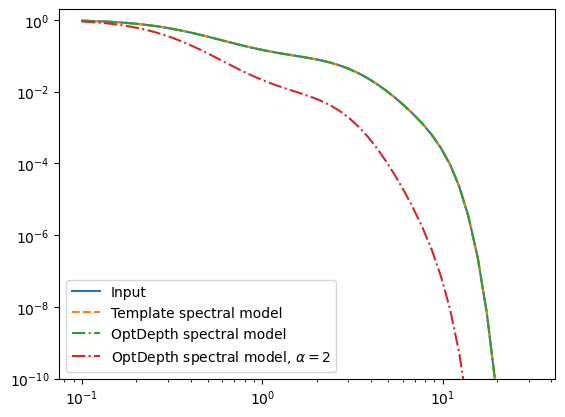
Now, you can use the OptDepthSpectralModel within a gammapy CompoundSpectralModel to fit the EBL normalization alpha_norm (or the source redshift) together with the intrinsic spectral parameters to your favorite blazar observation.